
Backmatter Matters: What To Add When You Need More Pages

You’ve written your children’s book manuscript.
You’ve hired a professional picture book editor.
And now, you’re eagerly diving into the paginating process - the process of dividing the text into pages and spreads so the illustrator can start storyboarding.
But, when you get to the end of the manuscript you discover you have a problem. Your beautiful book baby is only 20 pages long, and the minimum page count for KDP is 24. You are four pages short.
What do you do?
Don’t Panic
First, make sure you’ve included the basic pages that all children’s books should have - like a copyright page, a title page, etc. This post from Brooke Vitale explains those options well.
But assuming you’ve done that…
You could add more to your story. But adding content just to fill space is never a good idea, especially with children’s books where shorter is better.
You could re-paginate and stretch the current story over more pages. Definitely give this a try! But, if you find that this strategy causes you to add illustrations that are repetitive or just not engaging…or if the extra page turns make the story feel choppy…stop! Again, adding content just to meet a print requirement is never a good idea. And in this case, adding whole illustrations will cost you more money too! Never a good thing!
You could just leave those extra pages blank. But that’s going to look awkward to potential customers…and why waste valuable space that COULD be used to your advantage?
If you’re looking to lengthen a book that’s short on pages, here are some ideas for backmatter that will not only help you meet the minimum page requirements, but will also add value for your readers.
Promote Your Backlist
If this isn’t your first rodeo, and you have other books published, adding a page at the back of your newest release promoting those backlist titles is a great way to utilize extra pages. Here's an example from Brittany Plumeri, author of the Monster Manners Lab series.
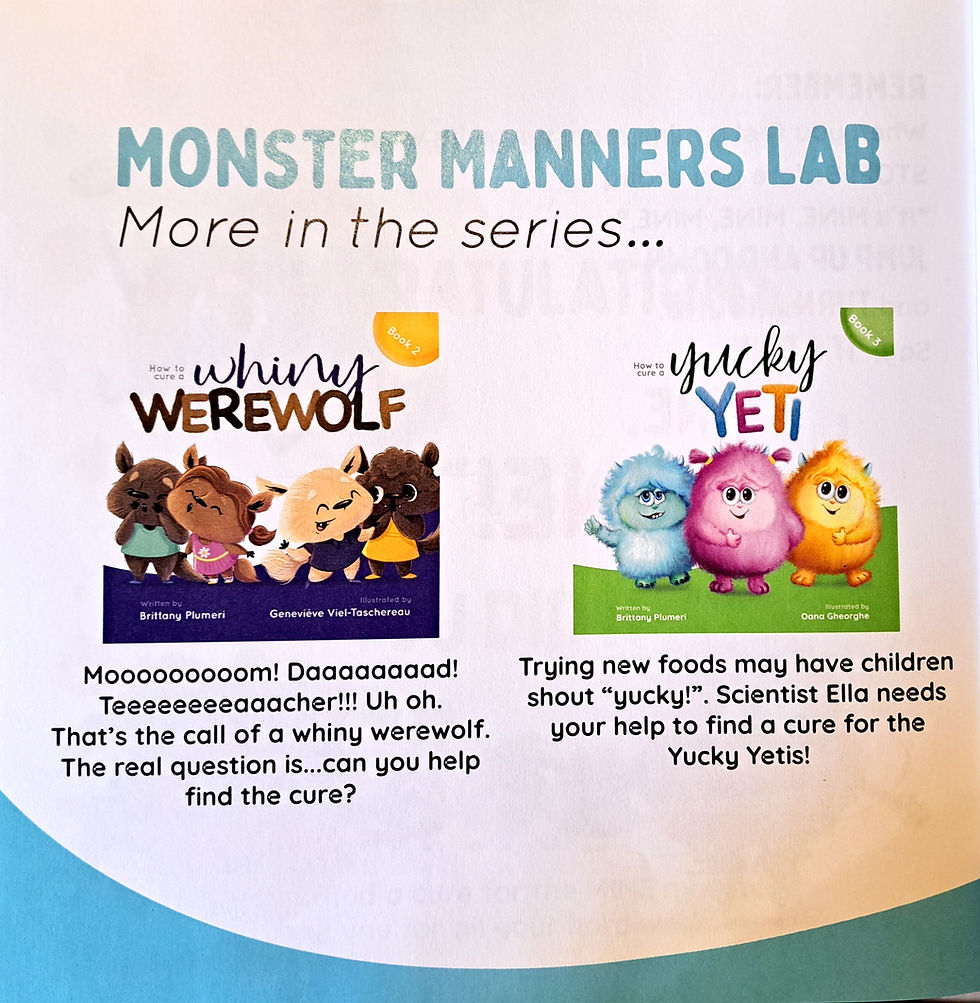
Think about it! Just as a parent or teacher is finishing your book, enjoying that satisfying ending and thinking, “That was great!” they turn the page and WHAM! There are more books by the same wonderful author! And if they’re reading it with a child on their lap, the little one is sure to see your attention grabbing covers, point and beg, “Let’s read this one next!”
⭐Tip: Be sure to include your website or a QR code that allows them to easily purchase your books in the moment.
Ask For A Review
Many readers who loved your book might never think to leave a review simply because it slips their mind. By including a QR code on the last page, that links directly to the Amazon or Goodreads listing for your book, you just might convince a few of those absent minded readers to leave a review right then and there.
⭐Tip: Include a spot illustration of the main character, asking the CHILD what they thought of the book, and asking them to help their parent leave a review! Getting the kid involved makes it even more likely that the parent will follow through.
Advertise Related Services or Products
If you offer services related to your books, the extra pages at the back of the book are a great place to promote them to your target audience! Include information on school visit packages, professional speaking services, or additional products like stuffies, coloring books, etc. And again, don’t forget to include your contact information.
In the example below, author Cheryl Johnson promotes a journal she sells to accompany her book, as well as plugging other books in the series.

⭐Tip: General statements like “Contact me about school visits,” aren’t likely to get a response. Instead, develop and pitch a specific school visit session(s) with a catchy title that will fill a need for classroom teachers. And include your email address!
Build Up Your Following
Today, children’s book authors don’t just write books; they often create additional dynamic content and share it with their target audience on their social media channels. If you’re trying to build up a following, include your social media handles on the last page of your book, along with a brief “pitch” explaining why they will benefit from following your account.
⭐Tip: Make sure your social media accounts are set up and won’t be changing anytime soon. Otherwise the information in your book will quickly become outdated and you’ll be re-uploading again and again.
Backmatter
Backmatter is the industry term for any additional content included at the back of a book that isn’t part of the story itself, but supports and extends a child’s learning about a certain topic. For example, if you’ve written a story about a rescue dog, you could include a checklist of “Things To Think About Before You Adopt A Pet.” Or, if your story is about a character who learns to love a traditional family recipe, you could include the recipe itself and a photo of the completed dish, in the backmatter. Backmatter can also include activities kids can complete directly on the pages…like a word search or a maze.
⭐Tip: Once you start thinking about ideas for backmatter, it’s easy to get carried away! Try not to clutter up the back of the book with too many pages of backmatter. (Two is plenty!) If you have additional ideas, you can always offer them on your website, in exchange for a customer’s email address! That's called a lead magnet!
Author and Illustrator Bio
If you haven’t included it elsewhere, the last page is a great place to put your author and/or illustrator bios and headshots. Kids love to “meet” the author and illustrator behind the story and seeing a photo of you helps them connect to you on a more personal level. Here's an example from author Vicky Weber in her book Forte Moves To Town.

⭐Tip: This isn’t the place for a professional bio or a list of your degrees. Keep it kid-friendly and engaging!
The Bottom Line
Don’t let a too-short story or a few blank pages keep you from your publishing dream! Use the ideas above to make your book even better than it already was!

If you've always wanted to write and publish a children's book, stop dreaming and start doing! Our Profitable Picture Book Program is an affordable way to learn everything you need to know to make your publishing dreams a reality.


Comments